Upload the supplier file
Upload CSVs, Excel .xlsx files, PDFs, invoices, packing slips, product sheets, JPG, PNG, HEIC, HEIF, or WebP images.
Shopify supplier-file intake
Upload a packing slip, PDF, CSV, Excel file, invoice, product sheet, or photo. Review extracted products, variants, SKUs, barcodes, prices, images, and quantities before approving Shopify draft products or inventory updates.
Workflow
Upload CSVs, Excel .xlsx files, PDFs, invoices, packing slips, product sheets, JPG, PNG, HEIC, HEIF, or WebP images.
Check product groups, variants, SKUs, barcodes, prices, quantities, image matches, and warnings before anything changes.
Create draft products by default, update existing inventory by barcode, or publish approved products only when you enable that workflow.
Try it with one real supplier file.
14-day free trial. Starts at $4.99/month.
Prepared for review
Safety
Catalog Intake keeps extraction, matching, warnings, and publishing decisions visible before the app sends approved changes to Shopify. New products stay draft by default.
New products start as Shopify drafts unless active publishing is explicitly enabled.
Review the batch summary, blocked rows, draft products, images, and inventory impact before approving changes.
Barcode-matched rows show the existing Shopify variant and quantity impact before inventory is updated.
Choose which fields Shopify receives, including titles, SKUs, barcodes, prices, inventory, images, tags, and metadata.
Pricing
Plans start at $4.99/month with a 14-day free trial. One upload means one submitted supplier file or image. A multi-page PDF or CSV can contain many products and still count once.
$4.99/month
10 uploads/month. Best first install for testing real supplier files. A multi-page PDF still counts as one upload, not one product.
$9.99/month
50 uploads/month for small stores that process supplier paperwork a few times each month.
$19/month
150 uploads/month for merchants using Catalog Intake as part of regular receiving and product setup.
$39/month
400 uploads/month for busier stores with frequent supplier files, packing slips, invoices, and image review.
Multi-page PDF: 1 upload
Supplier CSV or Excel file: 1 upload
Photo or scan: 1 upload each
Rows or products inside a file: no per-row count
Upload limits are based on submitted files and images, not product rows. If a store reaches its monthly limit, new file processing pauses while already processed batches remain available for review and push.
Try it with one real supplier file.
14-day free trial. Starts at $4.99/month.
Permissions
Catalog Intake needs product, inventory, Files, location, and publication access to prepare reviewed drafts, match images, update approved inventory, and optionally publish products you approve. It is not designed to collect customer records, orders, payment data, or shopper tracking data.
Needed to create approved draft products, read existing variants, and update approved inventory counts.
Needed to suggest image matches from files already uploaded to Shopify.
Needed so approved inventory updates can target the correct Shopify inventory location.
Used only when merchants enable active publishing to selected Shopify sales channels.
Used for account operation, billing, support, and required Shopify app workflows.
Catalog Intake is not designed to collect Shopify customer records, orders, payment data, or shopper tracking data.
Examples
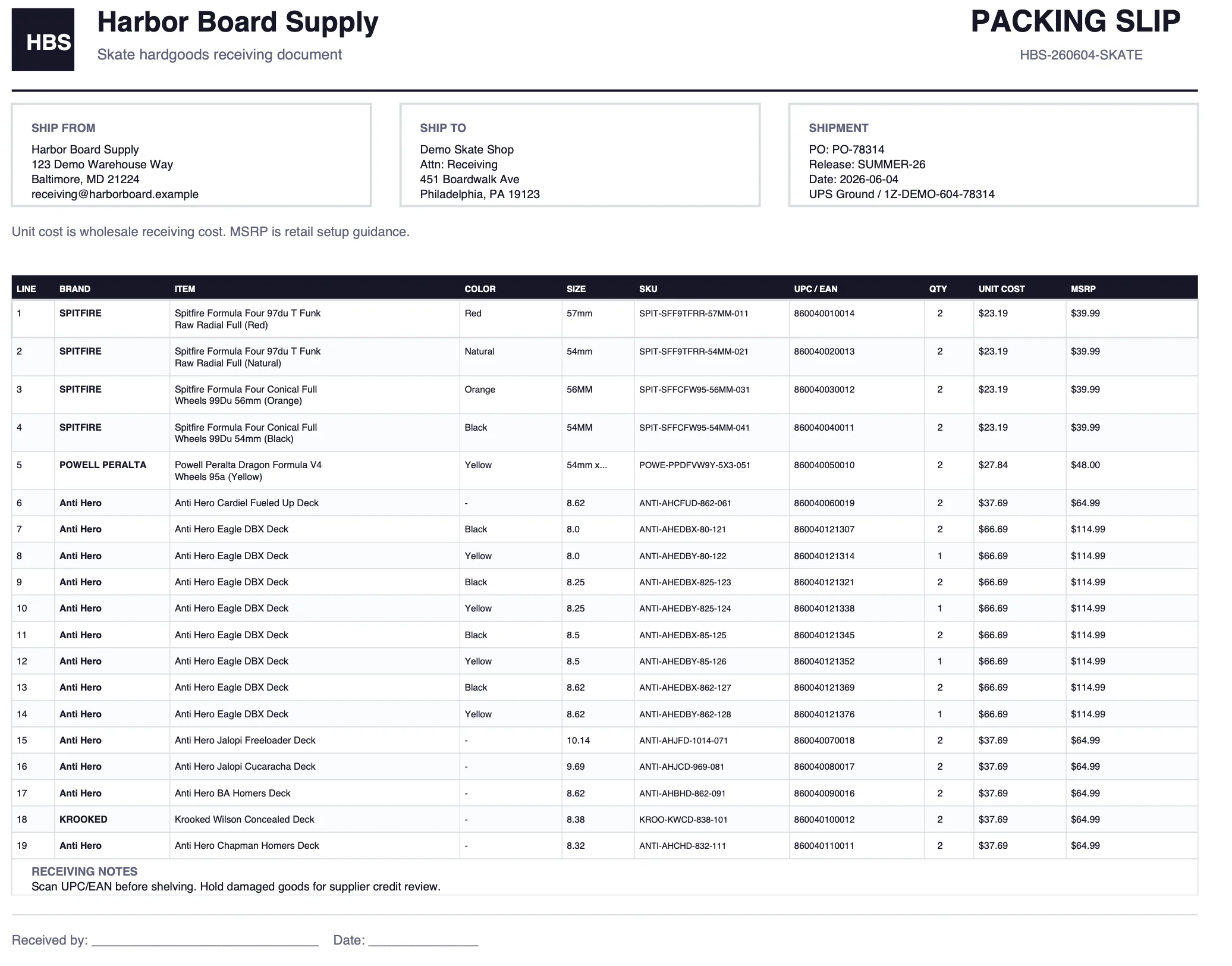
This example starts with a real packing slip and ends with draft products, barcode-matched inventory updates, images, and push readiness before anything reaches Shopify.
 View screenshot
The example begins with the packing slip merchants already receive: ship-to details, line items, brands, SKUs, UPCs, quantities, unit costs, and MSRP.
 View screenshot
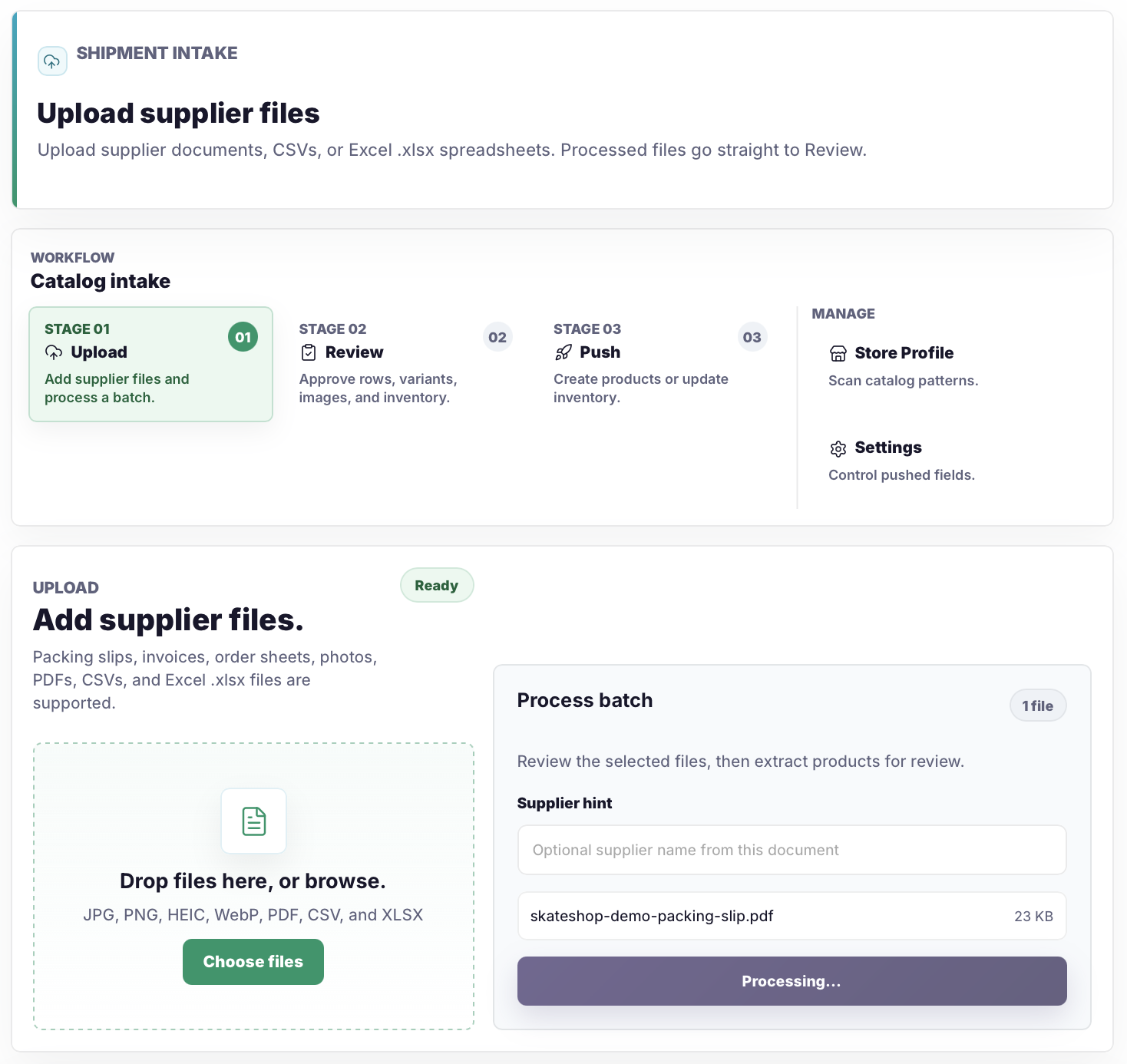
The merchant uploads the supplier file and processes the batch directly into review instead of turning it into a Shopify CSV by hand.
 View screenshot
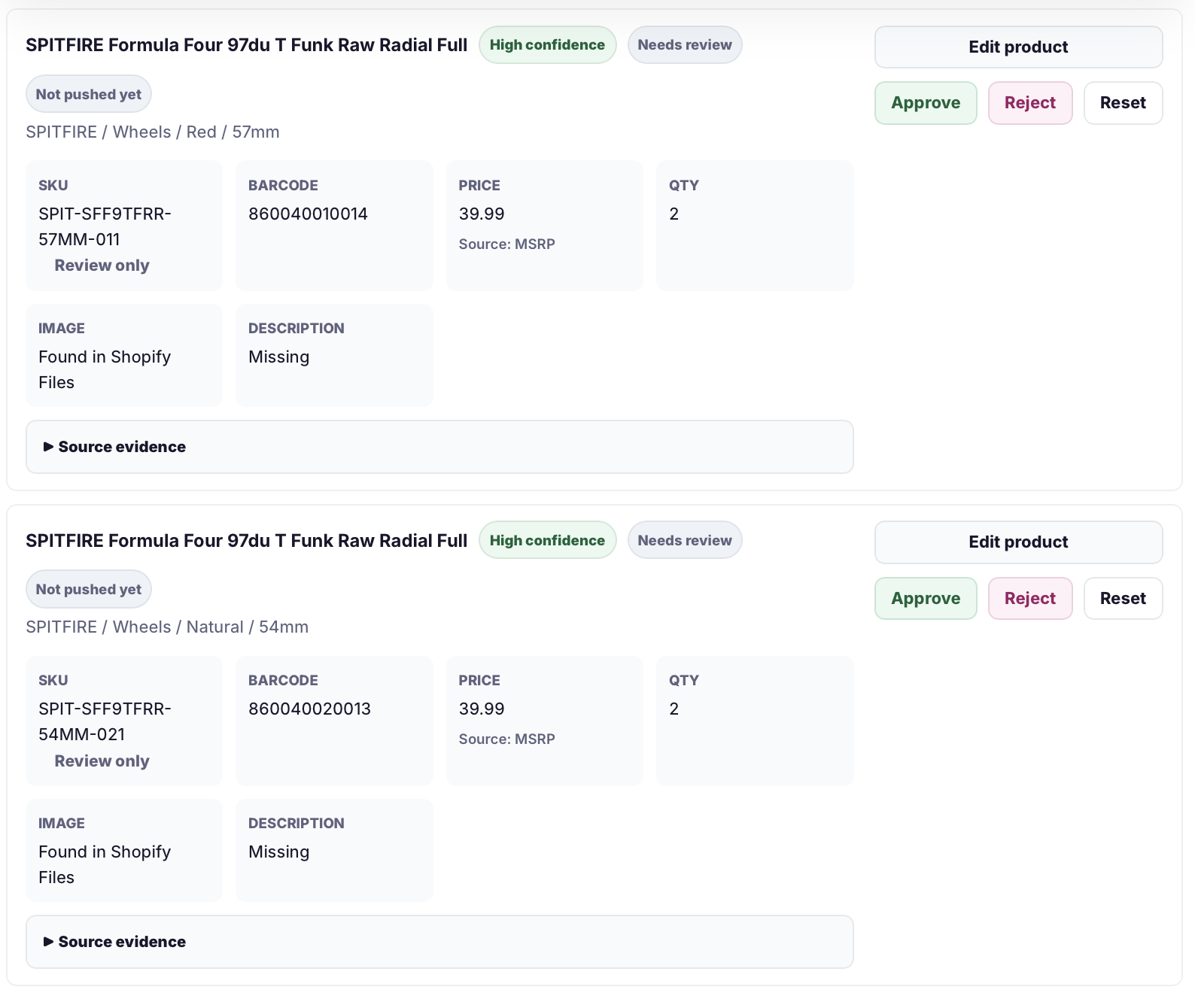
The review step shows titles, variants, SKUs, barcodes, prices, quantities, image status, and source evidence before rows are approved.
 View screenshot
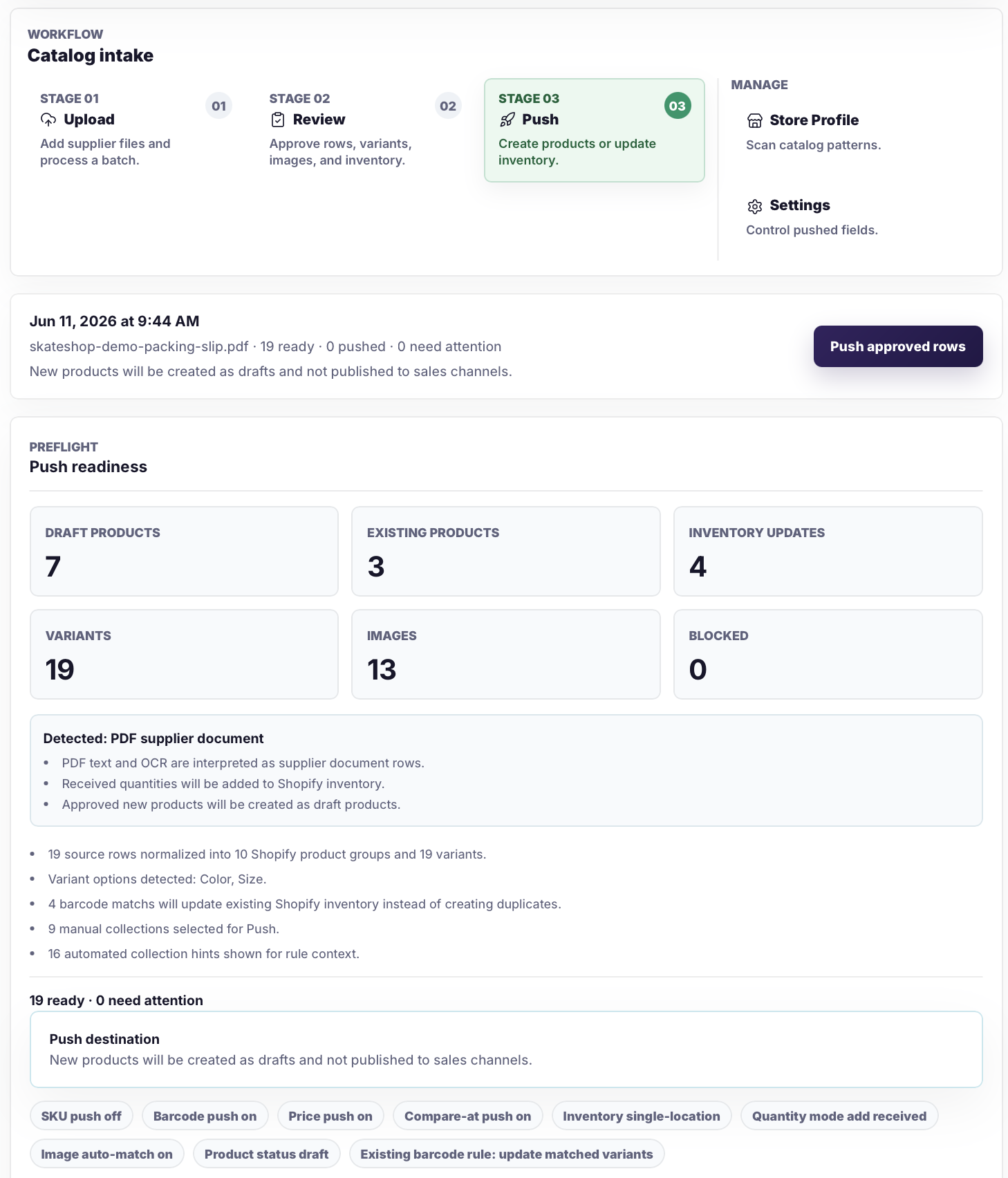
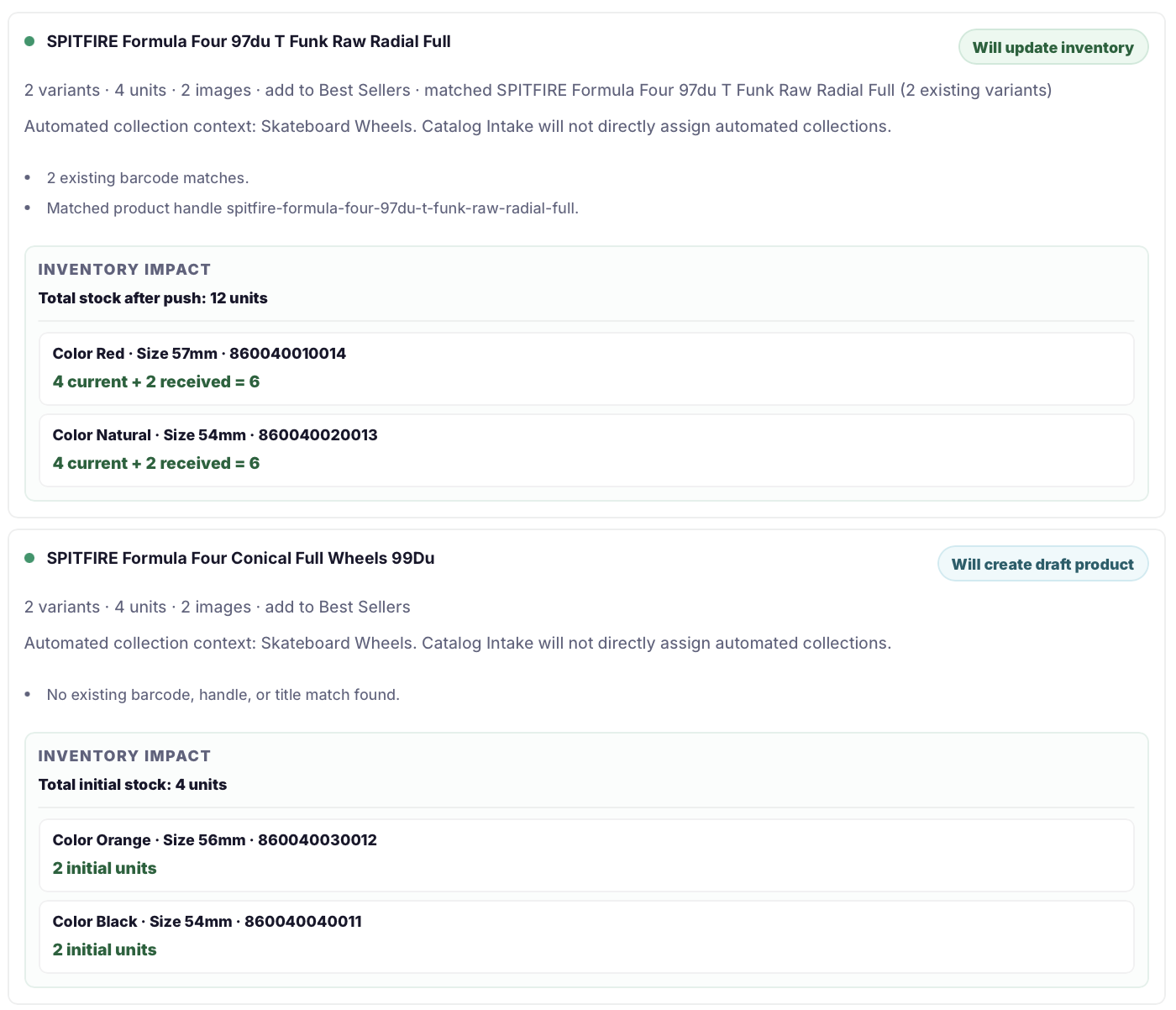
The push step summarizes draft products, existing products, inventory updates, variants, images, and settings before anything is sent to Shopify.
 View screenshot
For matched variants, the merchant sees current stock plus received quantity before approving the inventory update.
Try it with one real supplier file.
14-day free trial. Starts at $4.99/month.
FAQ
The biggest question is not whether the app can import a file. It is whether you can control what reaches Shopify. These answers cover that.
No. New products are created as drafts by default. Active publishing only runs when enabled, and merchants choose the Shopify sales channels before approving the batch.
One submitted supplier file or image counts as one upload. A multi-page PDF, CSV, or Excel file counts once even when it contains many products; separate photos count one image at a time.
Yes. Approved products can update inventory when they match existing Shopify variants by barcode.
Merchants review extracted rows, edit or reject items, inspect warnings, and see a push summary before approved products or inventory updates are sent to Shopify.
The batch stays in review. Merchants can edit or reject extracted rows before approving product drafts or inventory updates.
Catalog Intake shows barcode matches for existing Shopify variants during review. If a row matches an existing barcode, the merchant can approve an inventory update instead of creating a duplicate product.
New file processing pauses until the limit resets or the plan is upgraded. Batches already processed during the billing period remain available for review and push.
Yes. Billing is handled through Shopify, and the app has a 14-day free trial before the monthly plan starts.
Yes. The review flow lets merchants inspect extracted rows and approve, reject, or edit before sending product drafts or inventory updates to Shopify.
Catalog Intake needs product, inventory, file, location, and publication access for reviewed drafts, image matches, approved stock updates, and optional publishing. It is not designed to collect customer records, orders, payment data, or shopper tracking data.
Try it with one real supplier file.
14-day free trial. Starts at $4.99/month.